Previous Top Next
SubClass field

This document describes the format of the SubClass element in Garmin GPX files. But it can also be found in trip files in field mUdbDataHndl.
Data that can found in the subclass field.
-     MapSegment
-     RoadId
-     Begin/Shaping point/Via point
-     Lat/Lon values

Terminology:
BaseCamp
GPX file (XML Format)
Zumo XT(2)
Route
<RTE>
Trip
Via Point
<RTEPT>
Via Points, or <RTEPT> can be either:
·   Via point (Alert on arrival)
·   <trp:ViaPoint
Will alert, don’t skip, can be chosen as destination when starting trip.
·   Via point (Don’t alert on arrival)
·   <trp:ShapingPoint
Will not alert, can be skipped, can not be chosen when starting trip.
Ghost Points
·   N/A
·   <gpxx:rpt
N/A
Are added by BaseCamp/MapSource when a route is calculated. Points are located on a Road, and have road information. Can be used as a basis for creating track.

Objective:
·   Some problems found with the Zumo XT(2) are, or at least seem to be, related to the SubClass.
·   Shaping points get renamed when importing.
·   The routing works different for Shaping points and Via. It should be the same.
·   CEP. (Closest Entry Point). When starting a route with CEP, sometimes Shaping points are ignored. Via Points seem to work more predictable.
·   Knowing what info this SubClass contains, might help resolve them.

·   This info was collected by ‘reverse engineering’. It is not 100% complete, and may not be correct in all cases. Sources of info, tools used:
·   GPSBabel
·   GPSMapedit
·   JaVaWa GMTK
·   TypViewer
·   https://www.memotech.franken.de/FileFormats/Garmin_GPI_Format.pdf (Lat/Lon conversion)

·   A special value exists ’000000000000FFFFFFFFFFFFFFFFFFFFFFFF’. Once this is assigned it is never changed. I call it ‘Empty’, others suggest it is ‘Direct Routing’. This can be accomplished by exporting a route, modifying the subclass with an XML editor, and importing it back in Basecamp. Or by importing a GPX file created by another app like MyRoute App, Kurviger, Calimoto etc..

·   The Subclass is assigned when adding (inserting) a Via Point in Basecamp. Once assigned it is not always changed, even when it would be expected. (See Additional tests performed)

Additional tests performed:
·   Create a route with start, end, and 1 shaping point. Export gpx. Move the 2nd shaping point. Export gpx. Compare shows the same subclass!
·   Change Map product from City Navigator to Open Street Map or vice versa. Recalculate route. Subclass changes. Sometimes to ‘Empty’.
·   Change an initial Shaping point to Via. Subclass remains the same.
·   Change an initial Via point to Shaping. Subclass changes!
·   Moving a Shaping point to another location, Subclass remains the same.
·   Moving an initial Via point. Subclass remains the same. Then change to shaping, subclass changes.
·   When importing a GPX file without SubClasses in Basecamp, and subsequently exporting it then the SubClass is reset to ‘Empty’. An example of this is MyRoute App. MyRoute App has no knowledge of subclass. When importing a route exported from MRA all the subclasses are reset to ‘Empty’.

The results from these tests show that Basecamp does not always update the Subclass, although it would be expected. Furthermore the ‘Empty’ value gets assigned in some scenario’s, and does not seem to have a negative effect. Not in Basecamp nor in the XT.


Layout:
Because no documentation is available containing the layout, and I lack inspiration, I named the fields 1 to 9.
(TBD = To Be Defined)

Field 1
2 Bytes
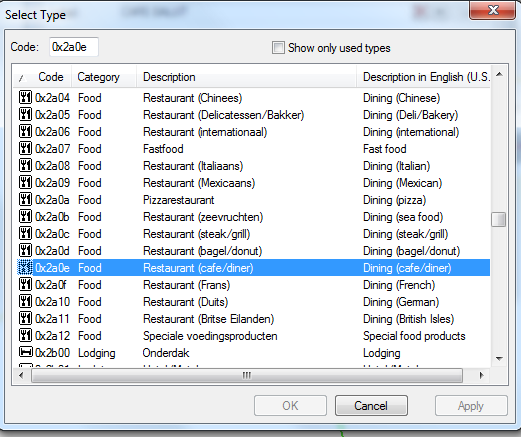
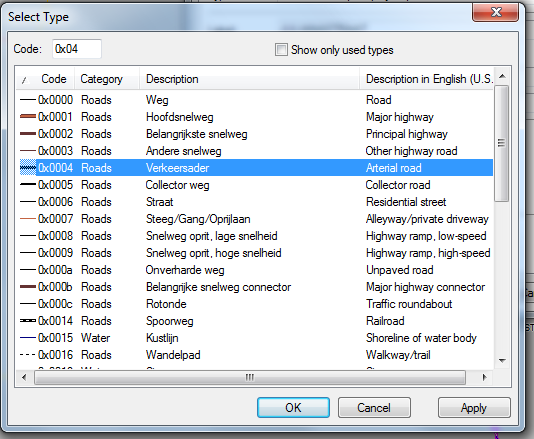
Can refer to a ‘line/road’, or a ‘point’. See the road and point types. Screen shot from GPSMAPEDIT.
Field 2
4 Bytes
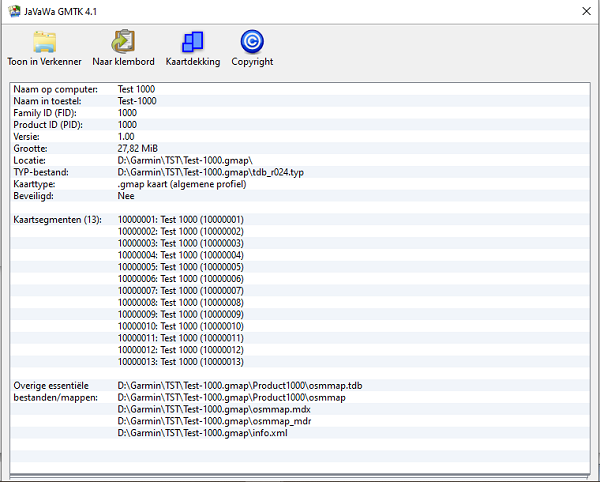
An integer specifying the map segment nbr.
Field 3
4 Bytes
This field is most likely a unique id of the road segment. Placing points along the same road this nbr. remains the same. But when passing a junction for example this nbr. changes.
There are clues that the last 2 bytes are flags. See RoadId Flags
Field 4
1 Byte
Looks like a type field. Values found:
0F = Begin
0D = Shaping point
01 = Via Point
Following fields are only valid for Shaping Points. See the explanation in the sample.
Field 5
1 Byte
Lat Byte 0
Field 6
1 Byte
Lon Byte 0
Field 7
1 Byte
Reserved = 00
Field 8
2 Bytes
Lat Bytes 1 & 2
Field 9
2 Bytes
Lon Bytes 1 & 2
For Via Points
Field 5-9
7 Bytes
TBD
For Ghost Points <gpxx:rpt
Field 4
1 Byte
Looks like a type field. Values found:
21 = Begin, or End of a segment. (Segment between Route points)
1F = Intermediate
Field 5
1 Byte
Direction indicator. See Direction values
Field 6
1 Byte
TBD
Field 7
1 Byte
Reserved = 00
Field 8
2 Bytes
TBD
Field 9
2 Bytes
TBD

Integers have to be read ‘backwards’. Little Endian.
Sample RtePt:  
<rtept lat="51.600542971864343" lon="5.660406164824963">
      <time>2022-10-09T17:45:21Z</time>
      <name>Erpseweg1</name>
      <sym>Waypoint</sym>
      <extensions>
        <trp:ShapingPoint />
        <gpxx:RoutePointExtension>
<gpxx:Subclass>040089969800050026010D24040097B17206</gpxx:Subclass>
<!-- Note that the empty Subclass does not conflict with the fields found! - ->
               0000 00000000 FFFFFFFF FF FFFFFFFFFFFFFF
<gpxx:Subclass>0400 89969800 05002601 0D 24040097B17206</gpxx:Subclass>
<!—
Field 1 (Little Endian)
00 04             = Road type, or Point Type. ‘polyline arterial road’ (See Road types)
Field 2 (Little Endian)
00 98 96 89 = 10000009  = Map Segment. (Sample is not City Navigator, but Open Street Map)
Field 3 (Little or Big Endian?)
05002601   = Unknown, probably road id for shaping point
                        The values remain the same for each road segment. (Between junctions)
Field 4
0D                = RtePt  0F = Begin, 0D = Shaping point, 01 = Via Point

Only valid for Shaping points. These bytes contain (part of) the Lat/Lon values of the next <gpxx:rpt node, not the Lat/Lon values of the <rtept node.
Fields 5 to 9
24             = Lat Byte 0
04             = Lon Byte 0
00             = Unknown, probably reserved for RtePt
97B1        = Lat Bytes 1, 2
7206        = Lon Bytes 1, 2

24(1) 04(2) xx 97(3) B1(4) 72(5) 06(6)

First the ‘real/decimal’ values have to be converted to ‘integer’ (4 bytes). Multiply by 2^32 and divide by 360
E.g.: 51,600542971864343 * 2^32 = 221622644520 / 360 = 615618457 = 24B19799 (hex)
Bytes 1,2 and 3 are used like this.

24(1) B1(4) 97(3) 99(.) = 615618457 * 360 = 221622644520 / 2^32 = 51,600542971864343

04(2) 06(6) 72(5) 07(.) =  67531271 * 360 =  24311257560 / 2^32 = 5,660405745729804

(.) Not used....
-->
          <gpxx:rpt lat="51.600542971864343" lon="5.660405745729804">
<gpxx:Subclass>040089969800BC3D0000211600009A000E00</gpxx:Subclass>
          </gpxx:rpt>

Road types
graphicgraphic
Point Types
graphic

Map segment nbrs. can be found with JaVaWa GMTK. Sorry screenshot only in Dutch.
graphic


RoadId flags
Part of source code of MkgMap.

https://www.mkgmap.org.uk/download/mkgmap-r4923-src.zip
mkgmap-r4923\src\uk\me\parabola\imgfmt\app\net\RoadDef.java

public class RoadDef {
        private static final Logger log = Logger.getLogger(RoadDef.class);
        public static final int MAX_NUMBER_NODES = 0x3ff;
        public static final int MAX_NUMBER_POLYLINES = 0x7f;

        public static final int NET_FLAG_NODINFO  = 0x40;
        public static final int NET_FLAG_ADDRINFO = 0x10;
        private static final int NET_FLAG_UNK1     = 0x04; // lock on road?
        private static final int NET_FLAG_ONEWAY   = 0x02;

        private static final int NOD2_FLAG_UNK        = 0x01;
//      private static final int NOD2_FLAG_EXTRA_DATA = 0x80; just documentation

        // first byte of Table A info in NOD 1
        private static final int TABA_FLAG_TOLL = 0x80;
//      private static final int TABA_MASK_CLASS = 0x70; just documentation
        private static final int TABA_FLAG_ONEWAY = 0x08;
//      private static final int TABA_MASK_SPEED = 0x07; just documentation

        private static final int TABAACCESS_FLAG_CARPOOL = 0x0008;
        private static final int TABAACCESS_FLAG_NOTHROUGHROUTE = 0x0080;

        // second byte: access flags, bits 0x08, 0x80 are set separately
        private static final int TABAACCESS_FLAG_NO_EMERGENCY = 0x8000;
        private static final int TABAACCESS_FLAG_NO_DELIVERY  = 0x4000;
        private static final int TABAACCESS_FLAG_NO_CAR     = 0x0001;
        private static final int TABAACCESS_FLAG_NO_BUS     = 0x0002;
        private static final int TABAACCESS_FLAG_NO_TAXI    = 0x0004;
        private static final int TABAACCESS_FLAG_NO_FOOT    = 0x0010;
        private static final int TABAACCESS_FLAG_NO_BIKE    = 0x0020;
        private static final int TABAACCESS_FLAG_NO_TRUCK   = 0x0040;

Direction values

This table is taken initially from: https://www.memotech.franken.de/FileFormats/Garmin_MPS_GDB_and_GFI_Format.pdf
(Look for Direction icon:)

Direction indicator
(Decimal)
Description
0
Continue
2, 15, 18
Right
3
Sharp Right
4
U-Turn
5
Sharp Left
6, 16, 19
Left
8, 11, 13, 17, 20, 21
Ahead
10
Turn Right
12
Ferry
14
Roundabout
22
Leave route point
23
Approach route point
24
Turn Left
25
Turn Right
29, 34, 35, 36
Route point
79
Exit Roundabout