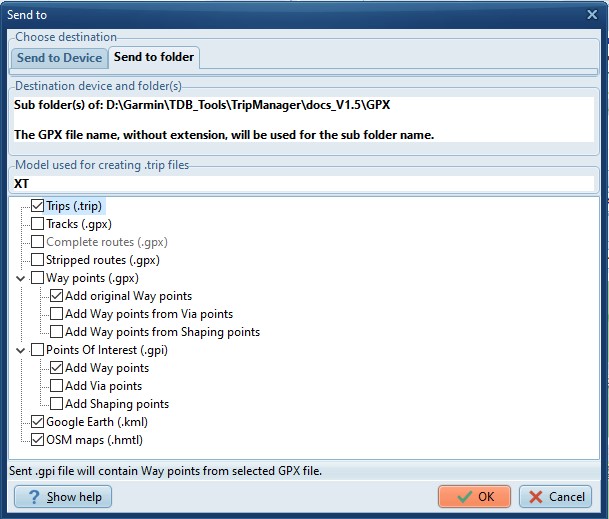
This function allows you to create various
file-types from GPX files. The files will be created in a sub
directory of the selected GPX file.
File types also usable on the XT(2)(3).
· Tracks. (GPX format) Tracks are created from selected
routes in the GPX file. To share your routes to users of other
GPS models. (EG TomTom)
· Stripped routes. (GPX format) Contains only the Begin,
End, Via and shaping points of the route. To force a
recalculation when loaded onto the XT(2)(3).
· Way
points (GPX format) The Tracks & Stripped routes don’t contain
the Way points from the original GPX. Check this if you need
them, for example to be able to navigate to a specific route
point, without using the route. Additionally you can create Way
points from the Via, and or Shaping points in the original
GPX.
· POI. (GPI format) Creates ‘Custom POI’. Custom POI’s, or
alerts, popup regardless of the route you’re driving. They will
be displayed with the correct icon, e.g. the chosen icon in
Basecamp.
· Trip files. (.trip format) Creates .trip files that can be
used right away on the XT(2)(3).
· The
file types mentioned above will also be created as needed when
you use ‘Send to device’. The difference here is that the files
will be stored on a different location and will not be deleted
when closing the program.
File types not usable on the XT(2)(3).
· KML
Files. The generated files will be usable in Google Earth, or
other programs supporting this format. For example Maps.Me,
Organic Maps or Google Maps.
· HTML Files. The generated HTML files can be used to share
your routes to anyone who is able to open a browser. In
Settings/General you can specify the format of the generated
HTML files. OSM, Kurviger, or both.
Notes:
· To
open a KML, HTML file you can double-click on the file in
TripManager. For KML you will need an application like Google
Earth.
· The XT3 actually supports importing from KML files. Needs
additional testing.