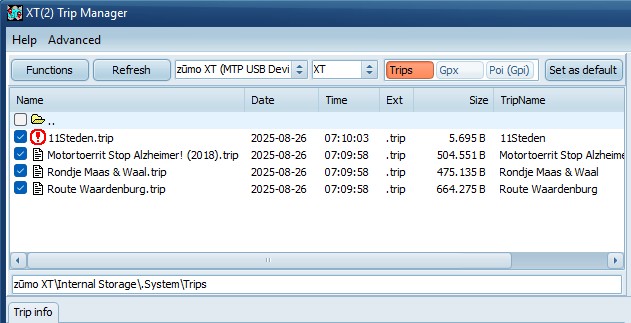
Navigate to an other folder by double clicking
on a folder. To navigate to the parent folder double click on
the 2 dots (..)
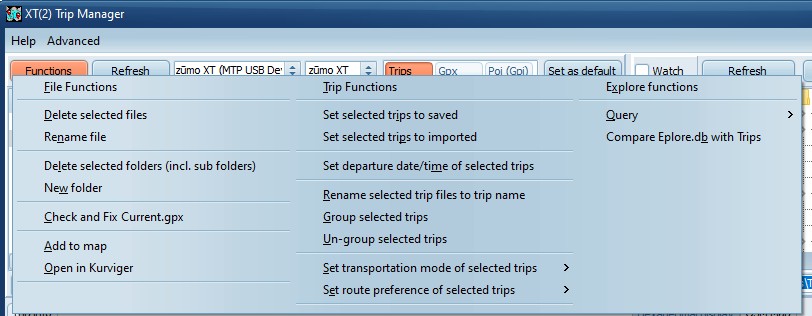
Functions
Displays a submenu.
The functions Delete and Rename
(on the left) are always enabled.
Delete selected folders and New
folder are only enabled if EnableDirFuncs=true on
the Device Settings.
Add to map Shows the selected trip/GPX
file on the map.
Open in Kurviger Open the trip file in
Kurviger.
The Trip functions in the middle are only
enabled if a .trip file is selected. See Trip
functions
Note: When deleting, or renaming, files
TripManager checks the file extension. Only extensions
.trip, .gpx and .gpi are considered safe.
Explore Functions (on the right)
The Explore
functions are only enabled if an
XT, XT2, XT3 or Tread 2, is connected and Explore functions (in
Advanced/Settings/Device Settings) are enabled.
Refresh
If no device connected, refreshes the list of
available devices, else it refreshes the files.
Select an MTP device
By default the program selects a supported
device. zūmo XT(2)(3), Tread 2 You can override that
choice.
XT, XT2, XT3, Tread2, Edge, Garmin,
Unknown
For functions that create .trip files the
program needs to know what your model is. It guesses that from
the connected device. You can override that here.
Trips, Gpx, Poi(Gpi)
The file list has 3 preset directories. You
can use these buttons for fast switching. The default locations
for the XT(2)(3) and Tread 2 are:
· Internal Storage\.System\Trips
· Internal Storage\GPX
· Internal Storage\POI
To change a preset setting, navigate to the
directory and click:
Set as default
At the bottom of the file list you see an edit
box with the currently selected directory. You can copy and
paste that in the Windows Explorer address bar. Also vice
versa, but omit ‘This Pc’.
Notes. In the Trips view:
· A
checkbox shows if the trip is saved, or imported.
Tips for use:
· To
select all files in the file list use CTRL+A.
· Clicking on the column heading sorts the files.